Architecture Tracer
Architecture Tracer is a web-based application which allows you to construct system architecture simulations and run simultation traces through them via a Command Line Interface(CLI).
You can try out Architecture Tracer directly below, or use it on your local machine after installing it by following the installation guide below.
Installation guide
- Install Node.js from https://nodejs.org.
- Download the repo here.
- Unzip the folder, and open the terminal inside the unzipped
architecture-tracer-mainfolder. - Run these two commands one at a time:
npm install npm run dev - Open the app site in your browser. (It should be in the pattern of http://localhost:XXXX/app/)
App components
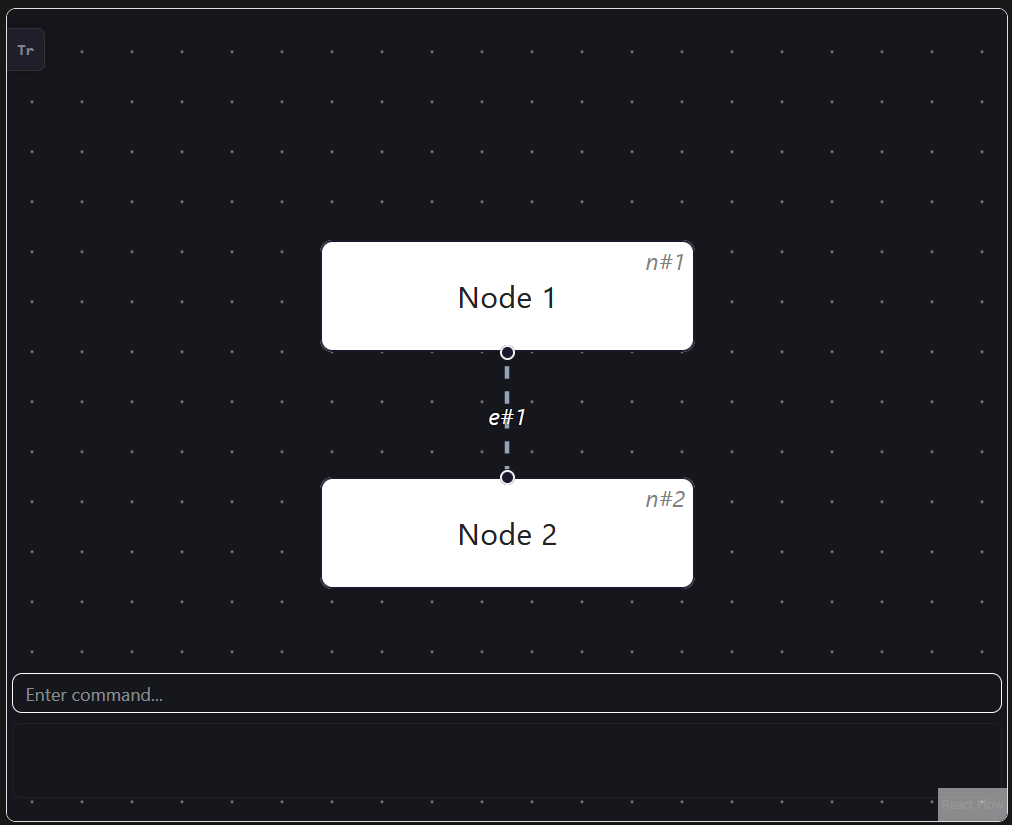
- Nodes: Nodes will be indicated by white rectangular boxes, with their id on the top right corner. This may reference this id for commands involving nodes.
- Edges: Edges will be indicated by white dashed lines, with their id overlayed on top. This may reference this id for commands involving edges.
- Command box: The command box is always on the bottom of the app, and can be typed into to execute commands.
- Response box: The response box below the command box will provide responses relevant to the last input command. The box and text will turn red to indicate errors.
- Sidebar: The sidebar can be opened by clicking the “Tr” button on the top left. Opening it will display the simulation trace.
Commands
ℹ️Notes about the command format:
-
Words in
SCREAMING_SNAKE_CASEare parameters to be supplied by the user. e.g. inadd n/LABEL,LABELis a parameter, so you might writeadd n/Database. -
Unrecognised commands or commands with incorrect formatting will result in an error message and be rejected by the app.
Adding/deleting nodes and edges
add n/LABEL: Adds a new node with a given labelNAME.add e/n#SOURCE n#TARGET: Adds a new edge connecting node with id “n#SOURCE” to “n#TARGET”.delete n#ID: Delete the node with id “n#ID” and all edges connected to it.delete e#ID: Delete the edge with id “e#ID”.clear: Delete all nodes and edges.
⚠️ Note: when there is an ongoing simulation trace, you will not be able to edit the architecture.
Simulation trace
trace n#ID: Begin a simulation trace on the node with id “n#ID“/continue the simulation trace to the node with id “n#ID“(must be connected to current node).trace end: End the current simulation trace.trace prev: Go to the previous trace step.trace next: Go to the next trace step.
For more detailed information, consult the User Guide.
Design
architecture-tracer utilises a Model View Controller(MVC) design pattern. As such the app can be largely split into the following three components:
- UI: The UI of architecture-tracer. Amongst other imported shadcn/ui elements, architecture-tracer also contains custom Node, Edge, command box, response box and side bar UI elements.
- Logic: The command executor of architecture-tracer. This component includes files
command.tsx,commandParser.tsx, andvalidationParser.tsx. - Model: Holds the data of the architecture-tracer currently in user. This is encapsulated by the
ArchitectureStateclass.
In addition, architecture-tracer also utilises the Command pattern to execute the tasks.
Said patterns are used in this project as they are both very fitting for an application which executes tasks based on user input one at a time; as well as an application which centres around changing stored information based on external inputs and displaying said information to the user.
Requirements and Assumptions
- Should be accessed primarily via a Command Line Interface.
- Should utilise React for the frontend.
- Architecture data must be compatible with React Flow’s Node and Edge formats.
- Should run smoothly (e.g. always respond to user input within 250 milliseconds).
Future Enhancements
As this project was made from scratch in the span of 3-4 days, there remains a lot of room for improvement. Here are the enhancements I would like to implement if given more time, in no particular order:
- Enhanced UI elements: The current GUI elements are quite barebones, with no option to customise them available to the user. Examples of improvements I would like to implement:
- More fluid UI: Pop-up animations for added nodes and edges, smooth transition of highlights during simulation trace
- Hover over nodes and edges for additional data
- Customisable UI elements: Allow the user to change the colour scheme and formatting of the app
- Persistent storage: Currently, the architecture-tracer app starts from a fresh slate on startup, with no option to save and load data. With more time, such features would be implemented.
- Undo/redo functions: Currently, there is no way to retrieve old data that is removed/changed by mistake. With more time, such features would be implemented.
- Edge direction: Currently, the direction of an edge does not matter in a simulation trace. Perhaps the simulation trace mechanics can be adjusted such that the edge can only be travelled by the trace in one direction.
- Higher test coverage: Currently, the test coverage of this project is around 68%. The coverage should ideally be higher for the sake of ensuring better code quality and easier development of the project in the future.
For more detailed information, consult the Developer Guide.